




The 6 best invoice processing software solutions for 2026 (according to users)
Is your invoice management software due for an AI-powered upgrade?
Finance leaders are embracing AI. According to the October 2024 PWC Pulse Survey, 36% of CFOs said they are using AI to automate accounts payable and accounts receivable, and another 34% plan to do it in the next 12 months. Is your team keeping up? If not, it’s time to explore your options. Here are the top-rated invoice processing solutions that companies choose to optimize their AP workflows.
1. Stampli: Ideal on accounts payable automation
Stampli is a procure-to-pay (P2P) platform that is centered on accounts payable automation. It extends beyond invoice processing to include procurement, payments, credit cards, and vendor management, with integrations to 70+ ERPs. Stampli enables the procure-to-pay workflow, while Billy, your AI employee, operates it. With 83 million hours of finance experience, Billy continuously adapts to your company’s unique processes, learning from every transaction to operate P2P exactly the way you work.
Features
- AI invoice capture and processing: Stampli’s platform uses AI and machine learning (ML) to capture, enter, code, and verify invoices. It learns your processes and workflows to improve invoice processing accuracy and efficiency.
- Stampli Cognitive AI™ for PO matching: Billy, your AI employee, understands context and performs three-way matching with 97-100% accuracy while maintaining human oversight.
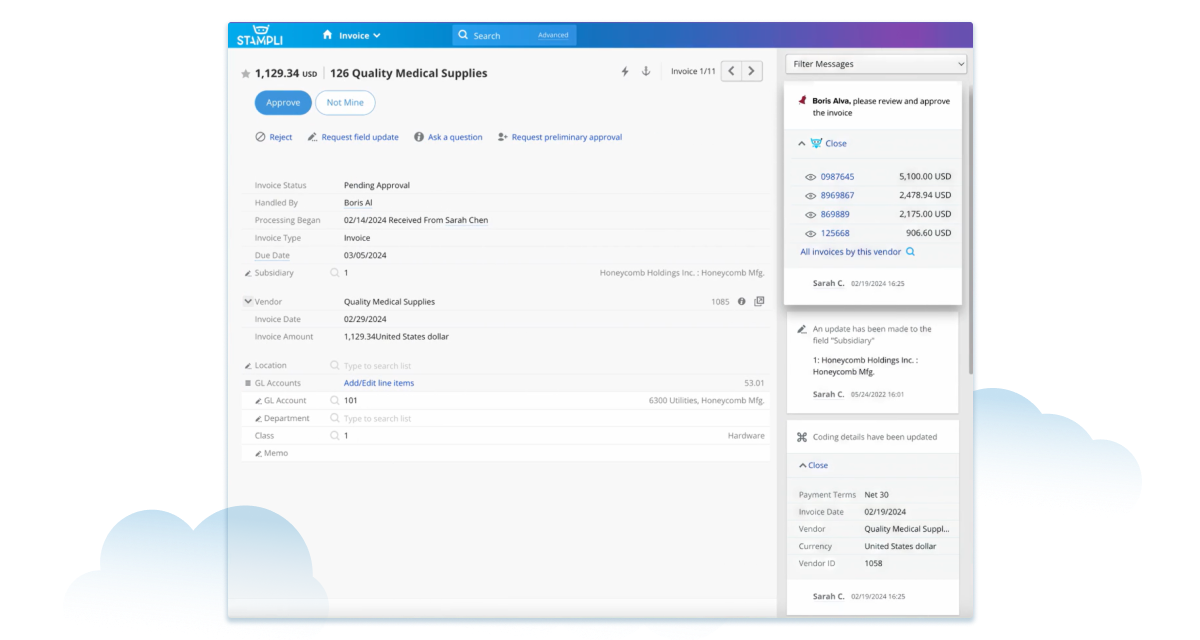
- Communication centered on the invoice: Communications between stakeholders and vendors, documentation, and actions are centralized in Stampli’s interface to reduce miscommunications and foster collaboration.
- Pre-built ERP integrations: Stampli has developed in-house integrations for GP, BC, Finance, Sage Intacct, SAP, Oracle NetSuite, Quickbooks Online, and 70+ other ERPs. They can be implemented in weeks without coding or rework to your ERP and support full native functionality.
Pricing
Stampli pricing is based on the services customers use.
Pros
Industry experts and user rating sites recognize Stampli as a leader in AP automation. Stampli has been named Best Finance & Accounting Software by G2, Top Rated AP Software by Gartner Market Brands, Buyer’s Choice for AP and Top Rated AP Software by TrustRadius, and Best AP Platform Integrations at the FinTech Breakthrough Awards. (That’s a lot of awards.)
Cons
Stampli’s solutions are appropriate for customers with large volumes of invoices, like government, midsized and enterprise businesses, and large nonprofits. Smaller businesses may find a solution designed for small and medium businesses more appropriate to their needs.
What Stampli customers say
Stampli customers like its versatility, user-friendliness, and customer support. In one review, a staff accountant on G2 says, “Stampli’s automation, user-friendly design, and focus on collaboration make it a valuable tool for businesses looking to streamline their accounts payable processes, reduce manual errors, and enhance operational efficiency.”
They go on to say that Stampli may not be the best solution for small businesses with limited resources, who may prefer “simpler or less comprehensive accounts payable solutions.” However, they describe the value Stampli has brought their business: “Stampli automates extraction of data from invoices, reducing the need for manual entry. This leads to fewer errors, faster processing, and greater accuracy in invoice management,” going on to say that Stampli helps them speed up approvals, reduce bottlenecks, and pay vendors on time.
2. BILL: Invoice automation for small and medium businesses
BILL (formerly Bill.com) is a web-based financial automation solution for small and medium businesses. It provides automated accounts payable and accounts receivable services to help organizations manage their cash flow.
Features
BILL offers four pricing tiers, but automated invoice capture and advanced routing are available only on the Team tier and above. The accounts payable component of BILL’s Essentials package includes the following invoice processing features:
- Invoice management: BILL lets customers import digital invoices automatically via email or file. It captures invoice data and assigns GL codes.
- Approval routing and user roles: Essentials customers can access standardized approval routing and user roles.
- ERP integration: BILL offers manual (CSV file) integration with QuickBooks Online and Xero to Essentials customers.
- Three-way matching: Customers subscribing to BILL’s premium Enterprise tier can access automated two- and three-way matching to verify invoices.
Pros
BILL provides a user-friendly interface that automates and simplifies accounting tasks, making it a good solution for small businesses wanting to streamline invoice processing. Customers can opt for higher-level tiers to access advanced services such as two-way integration, custom routing, and invoice matching as their needs change.
Cons
Many BILL customers report frustration with poor customer service, a lack of reporting and forecasting tools, and difficulty syncing with ERPs or accounting software. BILL’s AI capabilities center on OCR invoice data capture and duplicate detection, not full AI-driven coding or reasoning. It is primarily designed for SMBs rather than enterprise finance operations.
Pricing
BILL’s pricing starts at $55 per user per month for the Essentials plan, with higher-tier pricing available on request.
What BILL users say
BILL users say the platform has helped them optimize invoice processing and approvals. “BILL’s AP features solve several key problems, such as streamlining invoice processing and automating approvals,” says an accounting specialist in a G2 review. “The AI tool that extracts data directly from documents also minimizes manual entry, cutting down on errors and speeding up the overall process.”
In the same review, the customer mentions BILL’s limited reporting capabilities are a downside for their business because they are “limited and lack customization for more detailed analysis.”
3. Tipalti: Global payments and invoice management
Tipalti’s cloud-based financial automation solution includes AP automation, global mass payments, vendor management, and procurement automation.
It aims to help small, medium, and large businesses streamline their finance and accounting tasks.
Features
- AP automation: Tipalti uses AI and outsourced reviewers for invoice capture, data entry, coding, and verification. It also offers automated approval routing and payment processing to expedite vendor payments.
- ERP integrations: Tipalti’s website lists integrations with 14 ERPs. It also offers integrations with several CRM, communications, and payment platforms.
- Self-serve vendor management: Vendors can add or update information, submit invoices, and ask questions via Tipalti’s self-serve supplier portal.
- Fraud prevention: Tipalti provides built-in security measures to detect and prevent fraudulent activity.
Pros
Tipalti’s user-friendly invoice, fast international payments, and scalability make it a good solution for businesses expanding into international markets.
Cons
Customer reviews suggest that Tipalti may suffer from technical issues and that its support staff lack the expertise to solve complex problems.
Pricing
Tipalti’s Starter plan begins at $149 per month, with Premium and Elite tiers priced by quote.
What Tipalti customers say
Reviewers often mention how Tipalti streamlines invoice processing and vendor payments. One assistant controller described how Tipalti helped transform their AP process. They said that before using Tipalti, their business struggled to pay vendors on time and was “starting to have a reputation” for not paying bills. He acknowledged Tipalti for providing “one platform now to approve, code, and post invoices. One account to login and review…a lot of transparency that our company needed and virtually eliminated the pain point of invoice processing.”
However, this same reviewer also mentioned that their Tipalti implementation hit some obstacles. “We had a rough implementation that took almost a year to implement,” he said. He blamed the delay on challenges creating the CSV file integration — a process Tipalti said would take 6 weeks but which actually took 6 months. He reflected that he should have been more careful in choosing an invoice automation solution, saying, “I think if we had better vetted an implementation partner, it would have come sooner.”
4. Sage Intacct
Sage Intacct is a cloud-based ERP that provides financial management automation for small and mid-sized businesses. It offers accounts payable automation in its core financial platform.
Features
Intacct’s core financials include accounts payable functionality; the AP Automation module adds invoice capture, approvals, and payment partner integrations. Customers can add functionality by adding Intacct modules or third-party integrated solutions. Core features include:
- Invoice processing: Sage Intacct captures and enters invoice data using built-in automation and OCR tools, but it does not offer fully AI-driven or reasoning-based invoice capture.
- AP reporting: Offers processing performance and spending insights via customizable dashboards and reports to help customers manage cash flow.
- Payment processing: Sage Intacct connects with partners such as Corpay and Bill.com for payment execution; payments are not handled natively inside Intacct.
Pros
Sage Intacct provides a customizable and flexible solution for growing businesses with complex needs and offers industry-specific solutions for health care, construction, and other industries. It offers open APIs to facilitate seamless integration and data sharing with third-party apps to expand functionality.
Cons
Customers report that navigating Intacct’s complex menus can be challenging, and there is a steep learning curve for some functions.
Pricing
Sage requires you to speak to a sales representative to obtain pricing information.
What Sage Intacct customers say
Intacct customers speak positively about the platform’s flexibility and versatility for growing companies. A finance manager in healthcare shared on TrustRadius how it transformed their AP process: “Intacct’s AP automation has helped us increase AP invoice input accuracy and efficiency. Additionally, we have developed more robust financial reports that our CEO and executive team greatly appreciate.”
This sentiment is echoed by many users who report time savings and improved accuracy. However, it’s worth noting that some users, especially those new to the platform, find Intacct’s navigation complex and frustrating, with a steep learning curve. A Director of Finance at a nonprofit commented: ”Navigation can be inconsistent and confusing … pulling template reports with small changes can be unintuitive.”
5. Airbase: Intelligent spend management for AP
Airbase offers spend management automation for medium to large businesses and organizations. It provides an end-to-end solution that combines AP, procurement, and credit cards into one platform.
Features
Airbase groups its features into customizable service packages that include:
- Invoice processing: Airbase can receive invoices by upload, email, or through its vendor portal. It uses OCR and rules-based automation to extract and enter invoice data but does not provide true AI-driven invoice interpretation or reasoning.
- Supported three-way matching for NetSuite: Airbase supports two- and three-way PO matching for customers using NetSuite, but this functionality depends on the customer’s ERP setup and plan level.
- Reporting and analytics: Customizable reports and dashboards give visibility into spending patterns and aid fraud and error detection.
Pros
Airbase offers strong spend management features for customers wanting a single financial automation platform. It also automatically provides a full audit trail of all transactions, approvals, and user actions.
Cons
Airbase customers report experiencing technical issues with Airbase’s ERP integrations and mobile app. Others have mentioned that the reporting functionality could be better, citing limited reporting capabilities for AP.
Pricing
Pricing for Airbase’s Enterprise, Premium, and Standard service tiers is by quote only. It also allows customers to subscribe to platform modules separately. Airbase charges additional fees for some transactions and features.
What Airbase customers say
Airbase customers who use its invoice processing functions report it has improved the efficiency of their AP processes. “Airbase removes the hassle of manually inputting the invoice in [our] system,” said a G2 reviewer. They continued to say that Airbase reduces manual tasks and speeds up their invoice entry and visibility.
Other users commented about a lack of customization capabilities. One Senior Manager said Airbase had “lots of potential,” commenting that Airbase had “customization capabilities but more would be better. They complained that they were unable to customize Airbase and its third-party integrations to make them more specific to their needs.
6. SAP Concur Invoice: Expense management with AP functionality
SAP Concur Invoice is an invoice processing solution offered alongside Concur’s better-known travel and expense management services.
SAP Concur features
- Invoice capture and entry: SAP Concur uses OCR to automatically capture and enter invoice data and perform two or three-way matching.
- Approval routing: Concur offers customized approval workflows with mobile functionality to improve processing efficiency.
- Expense workflows: Concur combines expense management with the AP workflow to give visibility and control over all non-payroll spending.
Pros
SAP Concur Invoice is a good solution for businesses needing an all-in-one solution for AP and expense reporting. SAP Concur Invoice achieves its best performance when integrated with SAP ERPs such as S/4HANA or ECC; standalone users often rely on CSV or middleware connectors for synchronization.
Cons
Customers report that Concur implementations are challenging, and the user interface can be difficult to use.
Pricing
SAP only makes pricing available if you book a sales call.
What SAP Concur customers say
SAP Concur users generally like its unified approach to expense and invoice processing.“Solution: SAP Concur automates travel booking, expense reporting, and invoice management,” says one G2 reviewer, emphasizing that using Concur “leads to significant time savings, allowing employees to focus on more strategic tasks.”
However, the optimistic outlook isn’t universal. For some customers, technical issues, a complex interface, and slow implementations have been a source of frustration. A CFO venting on Capterra complained, “Couldn’t tell you if the system itself is any good or not because we have been working on the integration since April of 2024 (today is Jan 1, 2025) and WE STILL HAVE NOT COMPLETED THE INTEGRATION.” They further criticized SAP’s customer service as unhelpful and unresponsive during implementation.
Selecting the best invoice processing software
Finding the right invoice processing software solution for your organization can transform your accounts payable. Ultimately, the best solution is the one that delivers on these requirements:
Seamless integration with your existing business systems and ERP, with minimal changes to existing processes.
Scalable and flexible to meet the evolving needs of your growing business.
Transparent and fair pricing to provide good value for money.
Responsive customer service so your finance team will be supported during and after implementation.
If these describe your ideal invoice processing solution, Stampli may be the perfect fit. Get in touch with a Stampli AP expert today to learn more!
