
Microsoft Dynamics GP Integration

Your GP setup isn't standard.
We didn't build for standard.

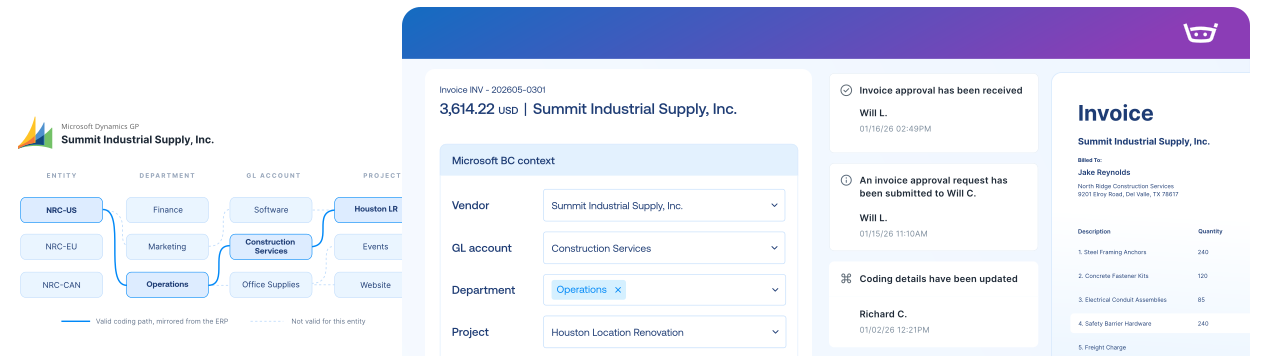
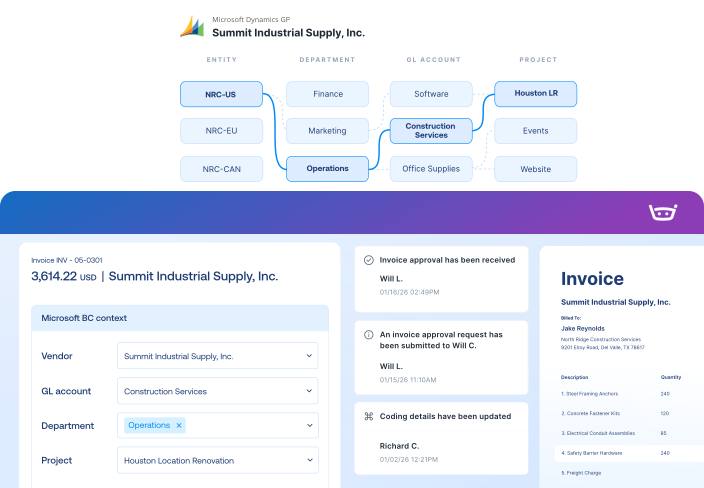
Keep your GP dimensions, POs, receipts, MEM structures, and custom fields working in native context.

Modern AP, connected to the GP foundation you trust

Stop rebuilding approved work

Company, batch, coding, and posting details flow straight into your GP transaction. No re-entry, no second system to reconcile.

Keep every add-on
in the loop

WennSoft, Signature, and other configured job-cost workflows stay connected to the invoice instead of living off in a silo somewhere.

Trace every posting back to source

Every approval, question, and document stays linked to its GP transaction, so an audit is a lookup, not a scavenger hunt.

Microsoft Dynamics GP Integration

Stampli Bridge connects to supported on-prem GP environments, so AP reflects your company databases, accounting lists, purchasing data, and workflows.
Microsoft Dynamics GP
Stampli
Lists
Vendor Lists
Vendor Lists
GL Accounts
GL Accounts
Open POs, Line Items, Receipts
Fields, Custom Fields (Dimensions, 1099, Company Code, etc.)
Payments
Posted Purchase Invoice
Invoice Authorized for Payment
Link to Stampli Invoice
Link to Microsoft Dynamics GP Invoice
Business Payment
Stampli Payment
Link to Stampli Payment
Link to GP Payment

Keep every invoice moving with GP context

Stampli runs the invoice-to-pay workflow, while Microsoft Dynamics GP remains your system of record for vendors, dimensions, invoices, and payments.

Capture every invoice path

Collect invoices from email, upload, vendor portal, CSV, and other configured intake channels.

Work invoices with GP context

Code, match, approve, and resolve exceptions with vendors, dimensions, POs, receipts, jobs, items, and charges in view.

Send validated records to BC

Export approved invoices, credits, coding, documents, and payment records back to Dynamics BC.

Keep vendors updated

Share invoice status, questions, and payment updates through vendor email and portal workflows.

America’s Auto Auction connected AP to Microsoft and kept scaling.

“Stampli was the only platform we found that could directly connect with our ERP, and that alone saved us at least 10 hours a week. As we’ve grown and added more auctions, Stampli has grown with us. The volume increased, but the process didn’t break, and we didn’t have to increase headcount to keep up.”

Adriane Lohsl

Accounts Payable Manager at America’s Auto Auction

10hrs/wk

 Saved with direct ERP connection

32,000

Invoices/month automatically processed

22 → 50

Locations added with same headcount​

The intelligent Procure-to-Pay platform

Microsoft Dynamics GP FAQs FAQs

Yes. Stampli supports multi-company GP environments and maintains the correct company context for each document.

Yes. Supported purchase orders and receipt data can be used for two-way and three-way invoice matching.

Some configured add-on and job-cost workflows, including WennSoft and Signature, can be supported. Compatibility gets confirmed during integration discovery, before anything goes live.

Through Stampli Bridge, a secure connection that uses Microsoft technologies such as eConnect to read the GP context AP needs and write supported transactions back. Our integration team maps company databases, accounting lists, purchasing data, and configured workflows before launch.nst the right project, with project accounting entries sent back to D365 F&O once approved.

Stampli can carry configured company, intercompany, coding, and batch information through the workflow. The integration team validates the required conventions against the customer's Dynamics GP environment before launch.

Configured exports use Microsoft eConnect and validation checks before supported records are written to Dynamics GP. Exact transaction, batch, coding, purchasing, and payment behavior is confirmed during implementation.