



Introducing Uline Punchout for Stampli Procurement

Ryan McClincy

Author

Ryan McClincy

Published

November 4, 2026

Read time

2 min

Today we are releasing punchouts to Uline for Stampli Procurement. Uline is where your team shops for supplies, and now that motion connects straight to the purchase request. Requesters browse the live Uline catalog, and the cart returns to Stampli automatically, with no retyping and no lost detail.

Punchouts Fit the Way You Already Buy

Stampli Procurement governs the purchase lifecycle from request through approval, PO creation, invoice matching, and payment. Requests start in a controlled process, move through the right reviewers, and build an audit trail as work happens.

Now it is integrated to where requesters actually shop. By linking the supplier catalog straight to the purchase request, the shopping your team already does and the record finance depends on are in one place.

How Punchouts to Uline Work

  1. Start in Stampli. The requester opens a purchase request inside Stampli Procurement, where approvals and controls already apply.
  2. Shop Uline directly. The requester punches out to the Uline site and shops the live supplier catalog, with real items, real availability, and real pricing.
  3. Bring the cart back automatically. Cart details return to the Stampli purchase request, so nothing has to be retyped or reconstructed.
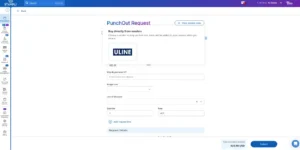
Stampli Procurement Punchouts to Uline


When the cart comes back, it carries everything finance needs to act on the request: item descriptions and SKUs, and quantities, along with the request context that ties it all together. Final invoiced totals can still shift with tax, freight, or fulfillment.

Explore Stampli Procurement

FAQ

What is a procurement punchout?
A procurement punchout connects a procurement workflow to a supplier shopping experience. A requester starts in the procurement system, shops the supplier site, and returns cart details to the purchase request, so the purchase keeps moving through approvals, POs, invoice matching, payment, and audit.
How does Uline Punchout work in Stampli Procurement?
For enabled Stampli Procurement customers that buy from Uline, requesters start a purchase request in Stampli, punch out to the Uline site to shop, and bring cart details back into Stampli automatically. From there, the purchase continues through the normal approval and finance workflow.
What details does Uline Punchout bring back into Stampli?
The returned cart can include item descriptions, SKUs, quantities, and related request context. That gives approvers, finance, and AP a stronger purchase record for review, PO creation, and invoice matching.
Does punchout replace approvals in Stampli?
No. Punchout does not replace approval controls. In Stampli Procurement, punchout connects supplier shopping to the governed request workflow, so cart details move through the same approvals, POs, invoice matching, payment, and audit process with better context.
Ryan McClincy
Ryan McClincy
Sr. Product Marketing Manager
Ryan McClincy is a Sr. Product Marketing Manager at Stampli, based in Nashville, Tennessee. His work focuses on translating product capabilities into clear, useful stories for finance teams navigating procure-to-pay, accounts payable automation, and modern finance operations. Before moving into product marketing, Ryan built experience in customer-facing sales and leadership roles, giving him a practical view into how teams evaluate, adopt, and get value from business software. He studied Psychology at The Ohio State University.

Share This Article