

ERP Integrations for Procure-to-Pay

Your ERP has rules.
We’re strangely into that.

Stampli learns the entities, dimensions, and posting rules behind every transaction, then returns a record to your ERP. No bounce-backs, no re-keying, no last-minute fixes before the close.

The happy-path invoice is not the test

The test is the invoice that spans entities, references three POs, arrives before the receipt, includes freight, or needs coding your ERP will reject if one value is wrong. Stampli was built for those transactions.

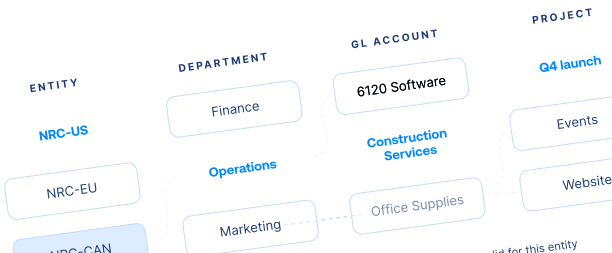
Understand the accounting structure​

Entities, dimensions, accounts, projects, vendors, and how they relate, all inside the workflow. People code from valid choices. Nothing gets reclassed at month end.

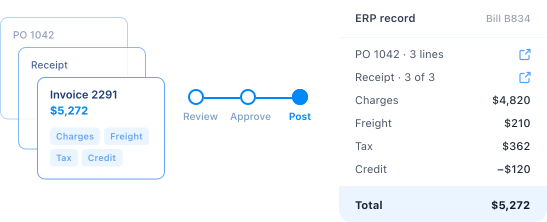
Preserve the transaction​

PO lines, receipts, service entries, charges, credits, and taxes, carried through review and approval. The record that posts is the transaction that happened.

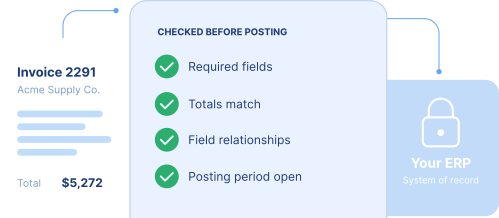
Validate before posting

Requirements, totals, field relationships, and posting conditions, checked before anything reaches the system of record. Exceptions get caught while they’re cheap.

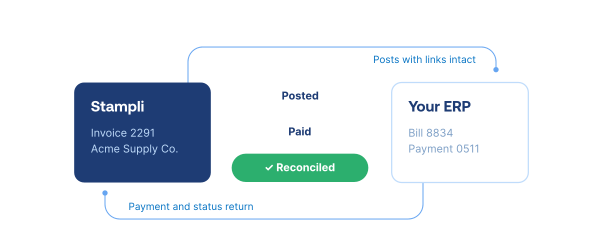
Close the loop

The completed transaction returns. The links between systems hold. Payment and status reconcile back. The close starts from a clean ledger.

Less time spent processing invoices at Wenspok Companies

By connecting invoice work to its ERP and giving every stakeholder one place to collaborate, Wenspok dramatically reduced average invoice-processing time.

“Stampli allows for us to more accurately project cash flow, which helps us provide drastically better financial guidance to our owners.”

Amanda Brown

Controller, Wenspok Companies

75% reduction

Average invoice processing time

87% decrease

Average days to approval

73% faster

Monthly close for credit cards

Integration depth changes what finance can control

Make decisions once

Give every stakeholder the ERP context to decide without relying on email or spreadsheets.

Fix exceptions earlier

Resolve coding, quantity, receipt, and charge issues before posting, while context is still available.

Keep the close clean 

Return documented, approved transactions to the ERP with less cleanup at close.

FAQ FAQ

ERP integrations for procure-to-pay connect purchasing, vendor, invoice, expense, approval, and payment workflows with the accounting structures and records in an ERP. Stampli uses ERP-aligned data inside the workflow and returns approved transaction information so the ERP remains the system of record.
Stampli supports more than 70 cloud and on-premises ERP systems, including systems from Microsoft, Oracle, Sage, SAP, Intuit, Acumatica, Dealertrack, and others. Integration depth and supported data vary by ERP and configuration, so use the ERP finder or speak with an integration expert for exact coverage.
No. Stampli connects procure-to-pay work to the accounting structures and records in your existing ERP. Employees and finance teams manage requests, invoices, approvals, vendor communication, payments, and related work in Stampli, while the ERP remains the system of record.
Depending on the ERP, product, and configuration, synced data can include vendors, entities, locations, GL accounts, dimensions, purchase orders, receipts, projects, jobs, items, invoices, credits, coding details, supporting documents, payment information, and transaction status. Stampli maps and tests the required objects and fields during implementation.
Stampli can connect through secure pre-built APIs for supported cloud ERPs, Stampli Bridge for supported on-premises systems, or structured file exchange for compatible workflows. The right connection method depends on the ERP, deployment model, data requirements, and configured process.
Stampli checks required fields, totals, coding relationships, and configured posting conditions before approved transaction information is sent to the ERP. Exceptions are surfaced for people to review and resolve, and authorized users retain control of approvals and posting.
Depending on the ERP and configuration, Stampli can support companies or entities, locations, GL accounts, dimensions, departments, projects, jobs, items, cost objects, and custom fields. During implementation, the integration team maps these structures and tests how they work together in the customer's workflows.
Implementation timing depends on the ERP, business complexity, and scope. Simpler environments may be measured in days, while larger or more complex deployments typically take weeks rather than months. The process includes discovery, field and workflow mapping, validation, testing, and launch support.